

The Step-by-Step Guide to Launching Your First AI Project for a Small Business
Mar 19, 2026
10 min read
Want a Custom AI Consultation?
Experience how BizClearAI can transform your business with immediate, actionable insights and AI-powered consulting.
Before you start: if you want the strategy layer (the “why + where AI fits long-term”), read How to Build a Small Business AI-Ready Business Strategy (Without Tech Overwhelm). If you want quick admin wins, bookmark 10 AI Admin Automations That Save Time, Reduce Errors, and Cut Costs.
Quick Answer
To start an AI project in a small business, you don’t need code or a giant budget—you need structure. Pick one painful workflow, define a measurable goal, run a small pilot for 2–4 weeks, track results weekly, document what worked, then scale carefully. If you want step-by-step guidance and ready-made prompts, start at BizClearAI and pull templates from the Prompt Library.
Introduction: You Don’t Need to Be a Tech Expert to Start with AI
AI can sound intimidating. A lot of owners picture complicated setup, expensive consultants, or “data science” that doesn’t match real life. But your first AI project shouldn’t feel like a research lab. It should feel like… a practical improvement to your week.
Whether you run a service business, a local shop, or an online store, AI can help you save time, reduce mistakes, and speed up decisions—without turning your business upside down.
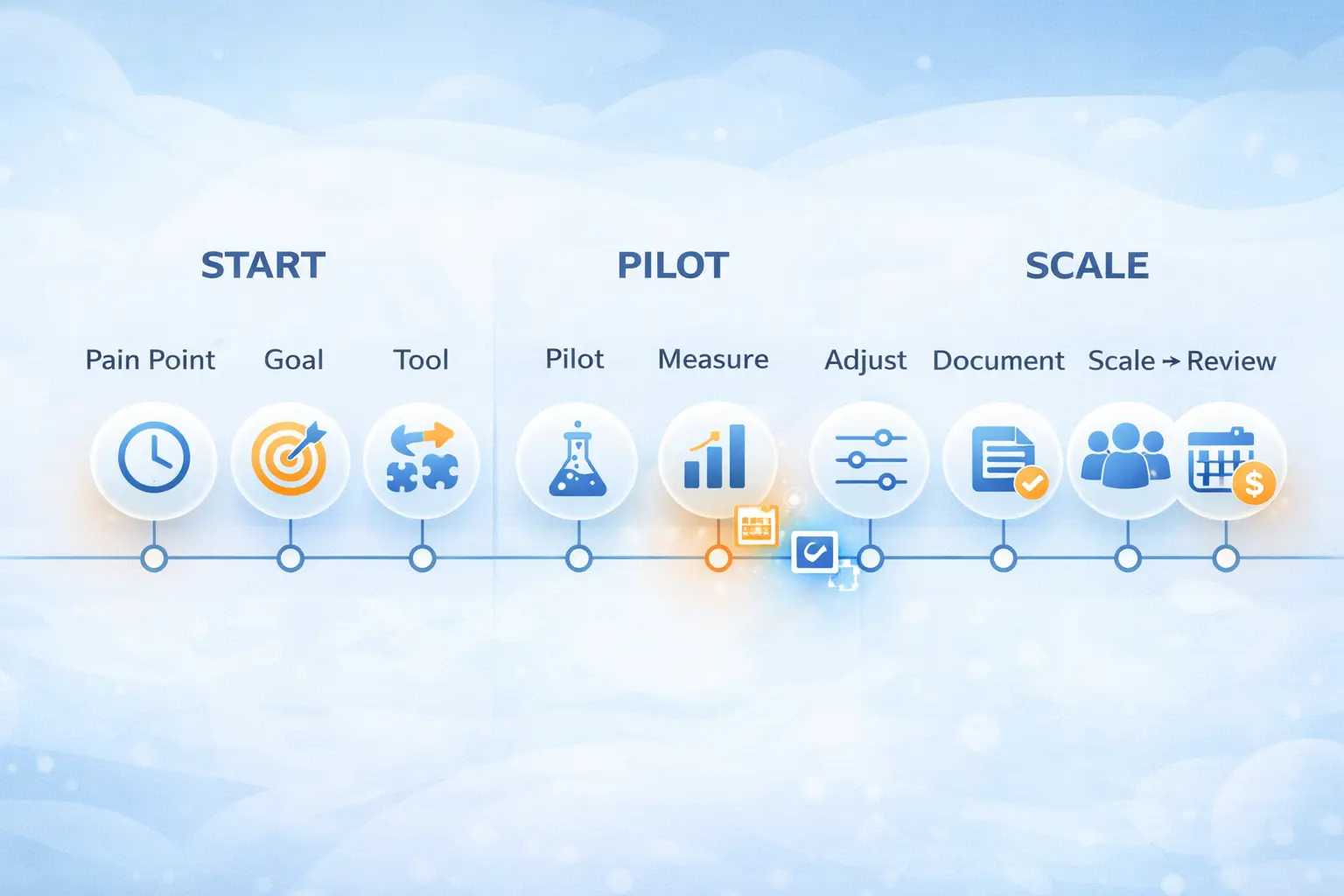
Step 1: Identify Your Biggest Pain Point (Not “Use AI”)
Most small businesses start with the wrong question:
❌ “How can I use AI?”
✅ “What’s one problem costing me time or money—and could AI help?”
Great AI projects start with real friction, like:
slow customer support replies
too much manual reporting
messy product descriptions
inconsistent abandoned cart follow-ups
repetitive admin tasks (invoices, emails, tracking)
If you want inspiration before choosing, read Why AI Automation Matters for Small Businesses for quick wins that don’t require a huge rebuild.
Online shop example
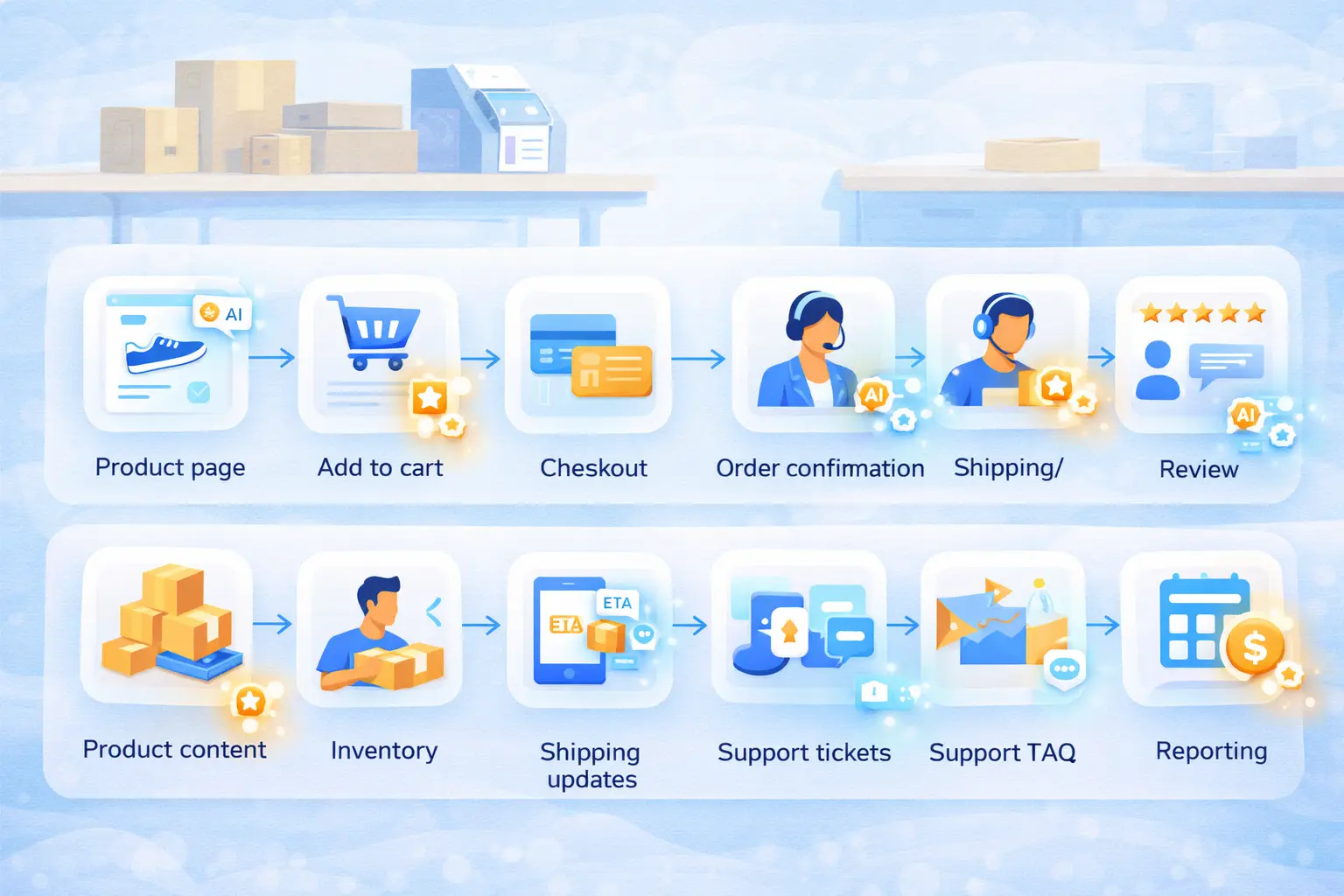
If you run an online shop, your “pain point” usually lives in one of three places: support load, conversion leaks, or operations chaos. Support load looks like answering the same questions all day (“Where’s my order?”, “Do you ship to my country?”, “How do returns work?”). Conversion leaks show up as abandoned carts, low email clicks, or weak product pages. Operations chaos is the behind-the-scenes stuff: inventory updates, supplier emails, refunds, and weekly reporting.
A simple way to pick your first AI project is to choose the one that’s most repeatable. For example, “reduce WISMO tickets” (Where Is My Order?) is a perfect first AI project because questions repeat, answers are consistent, and results are easy to measure: fewer tickets, faster replies, happier customers.
Step 2: Define a Clear, Measurable Goal
A good AI project has a finish line. Without one, you’ll never know if it worked.
Pick a goal tied to time, cost, or revenue:
“Reduce customer response time from 12 hours to 2 hours.”
“Cut product description writing time by 70%.”
“Reduce refunds caused by wrong expectations by 10%.”
“Increase checkout completion by 5%.”
Online shop example
For eCommerce, one of the cleanest measurable goals is conversion-related: “Improve add-to-cart to checkout completion by X%.” Why? Because AI can help with product page clarity, FAQ coverage, better email follow-ups, and faster support answers—all of which influence conversion.
Or go operational: “Reduce support tickets per 100 orders by 20% in 30 days.” That’s measurable, and it’s also GEO-friendly because it improves experience for regional customers (shipping questions, delivery expectations, customs/taxes). If you sell across countries or regions, AI can help keep your messaging consistent across shipping zones—same policy, localized details.
Step 3: Pick the Right Tool (Start Simple)
You don’t need an enterprise platform for your first AI project. Look for:
simple setup (no coding required)
works with your existing tools
clear pricing
business-friendly outputs (not “cool demos”)
If you want a guided approach (plus prompts tailored to your goal), start at BizClearAI.
Online shop example
Online shops often make the mistake of buying five tools at once: an AI writer, a chatbot, a personalization engine, an analytics add-on, and an automation tool—then nothing gets adopted because it’s too much. For your first project, pick one foundation tool and keep the scope tight. For example: one tool to generate and standardize support replies, plus a simple workflow to route questions to the right place.
If your first project involves messaging (support replies, product pages, emails), the fastest way to get quality is using templates instead of reinventing prompts every day. That’s where the Prompt Library matters—because consistency is what makes the “AI output” sound like your brand, not like a random robot.
Step 4: Design a Small Pilot Project (2–4 Weeks)
Don’t “go all in.” Run a pilot you can measure. Your pilot should:
focus on one process
run for 2–4 weeks
track one primary metric
include a human review step at the beginning
If you want proven workflows to model your pilot after, use 10 AI Admin Automations That Save Time, Reduce Errors, and Cut Costs.
Online shop example
A great eCommerce pilot is “AI-assisted customer support for top 20 questions.” You build a small FAQ playbook (shipping, returns, sizing, order status, payment issues) and have AI draft replies. Humans still approve replies at first, but you’ll quickly notice which answers are “always the same.” That’s where the real savings show up.
Another strong pilot is “AI product page upgrade for top 10 SKUs.” Instead of rewriting your whole catalog, pick your best-selling products (or the ones with the highest returns). Use AI to improve descriptions, add a short FAQ section, clarify sizing/materials, and create a “who this is for” paragraph. Then measure: bounce rate, time on page, add-to-cart, returns.
Step 5: Test, Measure, and Adjust Weekly
AI projects fail when owners “set it and forget it.” Your pilot needs a weekly check-in:
Are outputs accurate?
Are customers responding better?
Are you saving time?
What needs more context?
Mini calculators (simple, practical)
Time saved value (monthly) = hours saved/week × hourly value × 4.33
Pilot ROI (monthly) = (time saved value + recovered revenue) − tool cost
Conversion lift value = monthly sessions × lift% × conversion value
Online shop example
If your pilot is support-based, track first response time, tickets per 100 orders, and CSAT (even a simple “Was this helpful?” works). If you see response time drop and tickets stabilize or fall, you’re winning. If responses feel off, your fix isn’t “ditch AI”—it’s “tighten the rules” (approved phrases, policy snippets, escalation triggers).
If your pilot is product-page based, track add-to-cart rate, return rate, and support questions per SKU. AI often reduces returns by improving expectations: clearer sizing, clearer materials, clearer shipping timelines. That’s also GEO-friendly: customers in different regions often have different shipping questions, so adding region-aware notes (delivery times, duties/taxes reminders) reduces friction.
Step 6: Document and Standardize What Worked
If your pilot worked, don’t rely on memory. Document:
the winning prompts
the workflow steps
what got approved vs. automated
the metric changes
common edge cases (weird scenarios)
For admin-heavy documentation workflows, link readers to 10 AI Admin Automations That Save Time, Reduce Errors, and Cut Costs.
Online shop example
Online shops scale through consistency. Documenting your AI workflow means your team can repeat it without reinventing the wheel. For support, that might look like a “Support Reply Playbook”: tone rules, approved policy blocks, shipping timelines, return steps, and escalation triggers for sensitive cases.
For product content, documentation might look like a “Product Page Template”: one section for benefits, one for specs, one for shipping/returns, one for FAQs, and one for trust signals. Once that template exists, AI can draft faster—and humans can review in minutes instead of hours.
Step 7: Scale What Works (Carefully)
Scaling doesn’t mean automating everything. It means expanding what already works:
apply the same workflow to more SKUs
move from “human approves every reply” to “human reviews spot checks”
connect steps across tools (trigger → draft → approval → send)
For expansion ideas, send readers to 10 AI Admin Automations That Save Time, Reduce Errors, and Cut Costs.
Online shop example
Once your support pilot works, scaling might mean adding automation for “easy wins” first: order status responses, return instructions, shipping ETA messaging. Keep a clear rule for what stays human: refunds beyond a threshold, angry customers, chargebacks, legal/privacy issues.
If your content pilot works, scaling might mean upgrading collections and category pages next. That’s where GEO can shine: build region-aware content blocks like “Shipping to the EU/UK/US” or “Local pickup in [City]” if you have it. Those small details reduce hesitation and can improve conversions in specific regions.
Step 8: Train Your Team and Create Buy-In
AI adoption fails when it lives only in the owner’s head. Make it a team habit:
show results (“we saved 12 hours this month”)
give 3–5 approved prompts
explain guardrails
celebrate wins
Your best training shortcut is a shared prompt pack—start with the Prompt Library.
Online shop example
In an online shop, training isn’t about making everyone “AI experts.” It’s about giving them a simple system: where to find prompts, how to use templates, what must be checked, and when to escalate. Customer-facing teams especially need guardrails so messaging stays consistent with your brand and policies.
A good buy-in move is to pick one annoying task your team hates (like repetitive order status replies), automate the draft step, and let them feel the relief. When people experience “I got 30 minutes back today,” adoption stops being a debate and becomes a habit.
Step 9: Build an Ongoing AI Review Process
AI tools and your business both change. Set a simple rhythm:
weekly check-in during the pilot
monthly review of prompts/templates
quarterly review of workflows and ROI
If you’re building your long-term approach, connect this step back to How to Build a Small Business AI-Ready Business Strategy (Without Tech Overwhelm).
Online shop example
For eCommerce, a quarterly review is where you align AI with seasonality: holidays, sale periods, shipping cutoffs, and new product drops. Your templates should update with your reality—latest shipping dates, new return windows, changes in supplier lead times.
This is also the moment to improve GEO performance. If you’re seeing traffic from certain regions, add region-specific FAQs, currency notes, delivery timelines, and localized trust elements. The goal isn’t to stuff locations—it’s to reduce buyer uncertainty in each market.
Step 10: Partner with a Trusted AI Guide
Going alone can work… but it often takes longer and costs more in trial and error. A guide helps you:
pick the right first project
define a measurable goal
build a workflow that fits your business
track ROI
scale safely
Start here: BizClearAI.
Online shop example
Online shops move fast. When you’re juggling inventory, ads, supplier updates, and customer support, you don’t have time for a six-week AI learning curve. A trusted guide helps you skip the “random experimenting” stage and go straight to a workflow that saves time or improves conversion.
BizClearAI also helps you turn your winning pilot into repeatable systems—especially when you combine it with a structured prompt set from the Prompt Library. That’s where AI stops being “something you tried” and becomes part of how your store runs every day.
Conclusion: Your AI Journey Starts Small—and Smart
You don’t need a massive budget or deep technical knowledge to launch your first AI project. You need a clear problem, a measurable goal, a small pilot, and a habit of reviewing results.
If you want the fastest next steps:
Explore admin workflow ideas in 10 AI Admin Automations That Save Time, Reduce Errors, and Cut Costs
Choose a ready-to-implement workflow from 10 AI Admin Automations That Save Time, Reduce Errors, and Cut Costs
Get simple task ideas from Why AI Automation Matters for Small Businesses
Build your long-term foundation with How to Build a Small Business AI-Ready Business Strategy (Without Tech Overwhelm)
Start guided execution at BizClearAI and grab templates in the Prompt Library
NEXT STEP:
Ask BizClearAI: “Help me choose and launch my first 4-week AI pilot project this month for my online shop.”
Share this post
Get Your Actionable Strategy Now
Join the many entrepreneurs using BizClearAI to scale faster and smarter.
No credit card required • Get 70 credits free every month